Quick verdict: A source-attributed look at Database Mart's VPS, dedicated and GPU hosting for creative studios that need rendering or AI capacity: what the provider says it offers, where the evidence is thin, and what to confirm before you commit.
Affiliate disclosure: This article may contain affiliate links. If you follow a link and make a purchase, the publisher may earn a commission at no extra cost to you.
Database Mart Review: Is This Hosting Provider Right for Creative Studios?
Database Mart at a Glance
Database Mart presents itself as an affordable US hosting provider that has been operating since 2005. Its homepage says it delivers VPS, dedicated servers and GPU hosting to developers, startups, trading teams and growing AI businesses, all backed by its own US-based hardware infrastructure. For a creative studio deciding where to run rendering, video or AI workloads, that mix is worth a closer look.
The company also publishes several headline figures: 500K+ global customers, 650K+ services delivered, 21+ years of trust and 24/7 human support. These numbers come from Database Mart's own site. They are useful context, but they are self-reported and have not been independently verified here.
The homepage lists three core product lines, each with a starting price:
- VPS hosting from $2.99/mo.
- GPU servers from $21/mo.
- Dedicated servers from $49/mo.
Around these sit supporting services: an application marketplace with pre-installed software, backup services and add-ons. Domains and SSL certificates are also listed.
How this review was produced: it draws only on Database Mart's public pages, including its homepage, a GPU VPS page, a customer story, a company-authored industry analysis and a documentation page. No hands-on testing or independent benchmarking was carried out. Where something is a vendor statement, we say so. Prices and specifications change, so treat every figure as something to confirm on the live site.
Shop Database Mart Review: Is This Hosting Provider Right for Creative Studios? →
Product Range for Creative and Technical Workloads
VPS hosting. Database Mart describes its VPS plans as having isolated CPU, memory and disk resources with root or admin access. Listed features include automated backups, an intuitive control panel and optional managed services. The homepage positions VPS for startups, small and medium businesses and trading bots, with plans from $2.99/mo. For most creative studios a basic VPS is more likely to serve supporting tasks than heavy rendering.
Dedicated servers. These are described as offering 100% exclusive resources and custom configurations, hosted in T2 US data centres, with 24/7 hardware support. The homepage lists them from $49/mo and targets high-traffic platforms and enterprise applications.
GPU servers. This is the line most relevant to studios. Database Mart says it offers 20+ NVIDIA GPU models, from entry-level inference to large-scale AI training clusters, with dedicated VRAM (no sharing) and high-speed NVMe storage. Plans start from $21/mo. A separate "Rendering Hosting" page is listed in the navigation under the label "GPU Servers for 3D Rendering".
GPU VPS. A newer GPU VPS line is described as optimised for AI and deep learning, AI inference, generative AI, 3D rendering and simulation workloads. The page also mentions product design and architectural visualisation among its use cases.
Marketplace images and add-ons. The application marketplace offers pre-installed software to cut setup time. One documented example is Microsoft SQL Server on Windows Server images, which Database Mart says is ready to use without manual installation. That is more relevant to studios running asset databases or internal tools than to rendering itself, but it shows how the marketplace is meant to work.
Where Database Mart Fits Well
Based on the provider's own material, several strengths stand out. Each is attributed to the vendor rather than independently confirmed.
One provider across several tiers. Because VPS, dedicated and GPU lines sit under one roof, a studio could in principle start small and move up without changing supplier. The GPU VPS FAQ supports this idea: it says that if the chosen GPU does not meet expectations, Database Mart can help switch to a different GPU model or even a dedicated server. It also says it can help upgrade memory, storage or compute as workloads grow.
Clear statements on fees. The same FAQ states that there are no hidden setup or deployment charges, and that the listed price includes the allocated resources and infrastructure support. That applies to the GPU VPS specifically; check the terms for other products.
A creative-studio example. Database Mart publishes a customer story from an architectural visualisation user who moved from a local workstation to an RTX 5090 GPU server. The user says they work with Blender, 3ds Max and D5 Render, and describes stable performance during long rendering sessions. The listed configuration runs Windows with 256GB of RAM and 240GB SSD, 2TB NVMe and 8TB SATA storage. Deployment is described as straightforward: install drivers and rendering applications, set basic parameters, and export projects directly from the server.
This is a single submitted testimonial on the vendor's own site. It shows that Windows-based creative software is a use case Database Mart promotes. It is not a benchmark.
Longevity and early GPU entry. Database Mart says it has operated since 2005 and launched its GPU hosting brand, GPU Mart, in 2021. A company-published analysis argues that this timing sets it apart from the many GPU providers that entered in 2025 and 2026. That is a vendor claim, but it is a specific one that readers can weigh when judging how long the company has run GPU infrastructure.
What to Check Before You Commit
A review built on first-party sources has limits. These are the main ones to keep in mind.
Self-published metrics. The customer counts, the market rankings and the "20 Years of Sustained Product Evolution" analysis all come from Database Mart. The analysis says it compares the company with 3,179 US-registered hosting brands rated 3.0 or higher on Trustpilot and finds that only a small share offer VPS, dedicated and GPU together. It is interesting framing, but it is not independent verification of service quality, and offering three product tiers is not the same as performing well on any of them.
Thin creative-studio evidence. Only one customer story in the material reviewed covers creative-studio use. It is a single user's account, not a benchmark, and it does not cover team workflows, render farms or collaboration.
Trials are not automatic. The GPU VPS FAQ says that to test before committing you should contact the sales team, who can arrange a testing environment based on your workload "whenever possible". That is not a guaranteed free trial.
Plan-specific restrictions. The SQL Server marketplace image is limited to Express Edition on Windows VPS plans (five eligible plans), and Express or Web Edition on dedicated servers (20 eligible plans). It is not available on servers using a shared IP address; a dedicated IP is required.
Older CPUs in the showcased configuration. The RTX 5090 example pairs the GPU with dual Intel Xeon E5-2697 v4 processors (36 cores, 72 threads). If your pipeline is CPU-bound, such as some simulation or pre-processing stages, that is worth checking against whatever configuration is on offer today.
Details not established. The material reviewed does not settle refund terms, uptime guarantees or current pricing for specific GPU models. Confirm all of these on the live site and in the terms of service before paying.
GPU Options for Rendering and AI Work
AI-generated generic editorial illustration — not a retailer product photo and does not depict the reviewed product or service. Help studios shortlist between GPU server, GPU VPS and dedicated server options based on workload, without model-by-model benchmark claims.

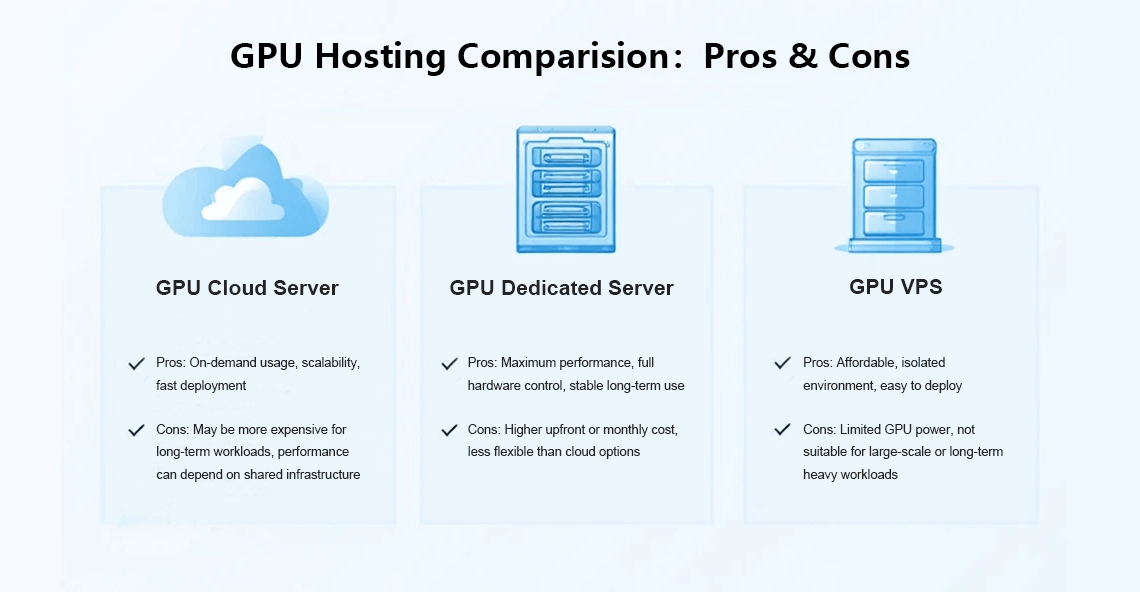
The first question for a studio is which kind of GPU hosting to shortlist. Based on how Database Mart describes its lines, a sensible starting framework looks like this:
- GPU server: the line with 20+ NVIDIA models, dedicated VRAM and NVMe storage, aimed at everything from inference to multi-GPU training. A reasonable first look for sustained 3D rendering or video production.
- GPU VPS: the newer line, positioned for AI inference, generative AI, 3D rendering and simulation, with stated paths to upgrade or switch GPU model. It may suit teams that want to start smaller and test.
- Dedicated server: the option for teams that want fully exclusive hardware and are comfortable with custom configurations. The GPU VPS FAQ names it as the fallback if a chosen GPU underperforms.
On specifications, the RTX 5090 example in the customer story lists 32GB of GDDR7 memory, 21,760 CUDA cores and 109.7 TFLOPS of FP32 performance. These are vendor-stated figures, not test results from us, and we make no model-by-model performance comparisons.
For AI-focused teams, Database Mart's navigation lists dedicated solution pages for Ollama, Stable Diffusion, vLLM and GPT-OSS hosting. If your studio is experimenting with local language models or image generation, those pages are a sensible place to compare requirements.
Whichever route you take, work out your VRAM needs and operating system first, and confirm current specifications and trial options with the provider.
Shop Database Mart Review: Is This Hosting Provider Right for Creative Studios? →
How It Compares With Practical Alternatives
This review does not assert anything about specific competitors, because none were examined. What it can offer is a set of criteria for comparing Database Mart with other options.
The alternatives most studios consider fall into three groups: hyperscale cloud GPU instances, specialist GPU rental marketplaces, and other dedicated server hosts. Database Mart's own pitch is that it combines VPS, dedicated and GPU lines in one company, which is a vendor claim rather than a ranking.
When you shortlist, compare these points side by side:
- GPU model availability. Does the provider stock the card your software needs, and with enough VRAM?
- Billing model. Database Mart's homepage prices are shown per month. Whether other billing options exist was not established in the material reviewed, so confirm this directly.
- Operating system support. Windows is shown in the customer story, but check your exact version and licensing.
- Data centre location. Database Mart describes US infrastructure. Consider latency and any data-residency needs.
- Support hours and channels. The company states 24/7 human support, with live chat, ticket and email options listed.
- Trial and refund terms. Compare how easy it is to test before paying.
The key trade-off is between long-running monthly rentals and hourly or on-demand cloud billing. A steady, daily rendering workload may favour a persistent monthly machine. Occasional bursts may favour pay-as-you-go. Work out your expected usage hours before deciding.
Who Should Choose Database Mart and How to Start
Likely fit. Studios and freelancers who want a persistent Windows or Linux GPU machine for rendering, video production or AI inference match what Database Mart describes and what its customer story shows. If you have outgrown a local workstation, as that customer did, this kind of rental is the obvious next step to evaluate.
Less clear fit. The evidence does not address burst scaling by the hour, nor guaranteed enterprise compliance requirements. If either is essential, look elsewhere or ask Database Mart direct questions before relying on it.
Suggested steps:
- List the software you run and the VRAM, CPU, RAM and storage it needs.
- Ask the sales team for a test environment, as the GPU VPS FAQ suggests.
- Confirm the operating system, IP arrangements and billing terms in writing.
- Check pricing, refund terms and uptime commitments on the live site.
- If nothing on the listed plans fits, use the custom GPU request form. The merchant invites you to describe your workload and hardware requirements and promises personalised recommendations.
When you are ready, review the current GPU plans and request a test environment through Database Mart's sales team.
Frequently Asked Questions
Does Database Mart offer a free trial for GPU hosting?
Not automatically. For its new GPU VPS, Database Mart says to contact the sales team if you would like to test before committing, and that it can arrange a testing environment based on your workload "whenever possible". Ask about terms, duration and cost up front.
Are there setup fees or hidden deployment charges?
For the GPU VPS, Database Mart states that pricing is fully transparent with no hidden setup or deployment charges, and that the listed price includes the allocated resources and infrastructure support. Check the terms for other products and any optional add-ons before ordering.
What happens if the GPU I choose is not powerful enough?
Database Mart says it can help you switch to a different GPU model or even a dedicated server if performance does not meet your expectations. It also says that sharing more detail about your workload helps it recommend the right solution. Ask how switching works in practice, including any billing implications.
Can I run Windows-based rendering software such as Blender or 3ds Max?
Database Mart's customer story describes a user running Blender, 3ds Max and D5 Render on an RTX 5090 GPU server with Windows installed. This is one user's account, so confirm that your specific software, version and licensing work on the plan you choose.
Can I get SQL Server pre-installed, and are there restrictions?
Yes, as a marketplace image on Windows Server 2016, 2019, 2022 and 2025. It is limited to SQL Server Express Edition on Windows VPS plans, and to Express or Web Edition on dedicated servers. It is not available on servers using a shared IP address, as a dedicated IP is required.
Sources
Editorial information: About our editorial team · Read our editorial policy · Read our affiliate disclosure.
Shop Database Mart Review: Is This Hosting Provider Right for Creative Studios? →